

The latest version of Kali Linux 2025.2, released on June 13, 2025 is more than just a routine update. It’s a bold move forward, reflecting a growing shift in how offensive and defensive security professionals use their tools. Codenamed the “Menu Refresh” release, this version introduces a smarter way to navigate hundreds of tools, several cutting-edge additions, major desktop environment upgrades, and some exciting innovations for Kali NetHunter users.
If you’re a penetration tester, red teamer, threat hunter, or cybersecurity hobbyist, there’s a lot to unpack in this release, and you’re going to love it.
Kali Linux 2025.2 Menu Refresh
Kali Linux’s tool menu has always been functional, but not exactly user-friendly, especially if you’re not already familiar with the massive library of tools bundled in. That changes in Kali 2025.2.
This release completely overhauls the application menu and organizes tools around the MITRE ATT&CK framework, the industry standard for mapping cyber threats. Instead of wading through categories like “Information Gathering” or “Password Attacks,” you now see tool categories aligned with real-world attack phases like Initial Access, Privilege Escalation, and Command and Control.
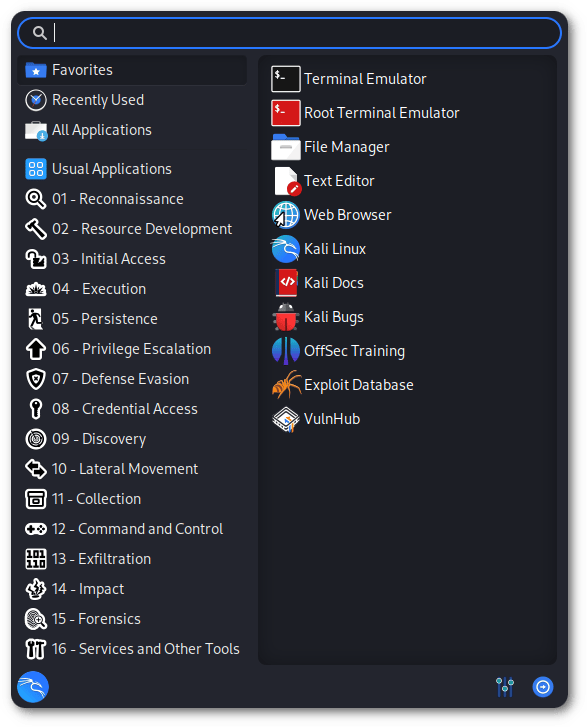
Why is this a big deal?
Because it mirrors how security professionals think. It’s not just easier to find the right tool, it’s easier to think strategically, plan engagements, and respond to threats. It’s a serious usability upgrade that makes Kali more intuitive than ever.
Also, the menu itself is now auto-generated using YAML files, which means future updates and customizations will be much easier to manage and contribute to. You’ll be able to tailor your environment without breaking a sweat.
Desktop Upgrades
Kali Linux 2025.2 also brings updates to its desktop environments (GNOME and KDE Plasma) and they’re not just cosmetic.
GNOME 48
- Notification stacking, for a less cluttered experience
- HDR display support, a treat for those with high-end monitors
- Dynamic triple buffering, which helps with visual smoothness
- A new document viewer called Papers
- A built-in VPN IP indicator, which adds a small but helpful privacy touch
KDE Plasma 6.3
- Improved fractional scaling, making high-DPI displays more usable
- Better Night Light settings for eye comfort
- Monitoring tools for CPU, GPU, and battery life
- More customization options for theming and layout
There’s a fresh collection of community-submitted wallpapers to give your desktop personal touch.
BloodHound Community Edition is Now Built-In
One of the standout additions in this release is BloodHound CE (Community Edition). It’s now included by default in Kali,complete with all the necessary ingestors like azurehound, bloodhound-ce-python, and sharphound.
BloodHound is a must-have for any security assessment involving Active Directory or Azure AD environments. It maps relationships, permissions, and privilege escalation paths within enterprise networks, something many attackers exploit and defenders struggle to visualize.
With CE’s improved performance and new interface tweaks, you’ll be gathering and visualizing data faster and more efficiently than ever before.
NetHunter Updates
Kali NetHunter, the mobile pentesting platform built on top of Android, got some love in this release too. One of the most jaw-dropping features? Wi-Fi injection via a smartwatch.
If you’re using the TicWatch Pro 3, which has a compatible Broadcom Wi-Fi chip, you can now carry out Wi-Fi deauthentication attacks and capture WPA2 handshakes straight from your wrist. That’s something we’d expect from a spy movie, and now it’s in your toolkit.
NetHunter now includes CARsenal, the newly revamped version of the old CAN Arsenal car hacking suite. This is a modular toolkit that comes with:
- hlcand, which adds ELM327 support
- A VIN decoder
- Fuzzers, listeners, and UDS/XCP modules via CaringCaribou
- ICSim, a VCAN simulator for vehicle CAN bus traffic
And if you use Android Auto, NetHunter now works seamlessly with head units too. Combine that with expanded kernel support for more devices (including newer Xiaomi and Samsung models), and NetHunter is shaping up to be the most versatile mobile pentesting platform out there.
13 New Tools You Should Know About
No Kali release is complete without a fresh batch of powerful tools. Here are the 13 new additions you’ll find in 2025.2:
- azurehound – Collects Azure data for BloodHound
- binwalk3 – Next-gen firmware analysis tool
- bloodhound-ce-python – Python-based ingestor for BloodHound CE
- bopscrk – Context-aware wordlist generator
- chisel-common-binaries – Tunneling over HTTP/SSH (TCP/UDP)
- crlfuzz – CRLF injection vulnerability scanner
- donut-shellcode – In-memory shellcode generator
- gitxray – GitHub-focused OSINT reconnaissance
- ldeep – Advanced LDAP enumeration tool
- ligolo-ng-common-binaries – Lightweight pivoting toolkit
- rubeus – Kerberos ticket manipulation and abuse
- sharphound – Ingestor for Windows BloodHound CE
- tinja – CLI tool for testing template injections
This lineup hits several key areas: cloud recon, firmware hacking, tunneling, OSINT, privilege escalation, Kerberos abuse, and more. Whether you’re on offense or defense, there’s something in here for you to explore.
How to Upgrade or Download
Already running Kali? Here’s how to upgrade your system:
sudo apt update && sudo apt -y full-upgrade && sudo rebootMake sure your /etc/apt/sources.list is pointing to the Kali rolling repository.
If you prefer a fresh install, updated ISOs and VM images are available on kali.org.

Discover more from Aree Blog
Subscribe now to keep reading and get access to the full archive.